Showing posts with label speed up my droid. Show all posts

June 30, 2012

Update for my Galaxy Y, its Awesome :)

Hello readers, this is me blogging from my home PC. As I was suffering from a severe tonsil infection in my throat, so I tried updating my trusty Galaxy Y to the latest firmware, i.e.
PDA:LE1/PHONE:LE1/CSC:LD1
(as seen in my Kies app) but in my phone menu, the Kernel version is showing up as S5360DDLE1. I didn't used Kies for updating it, just did a FOTA update.
So here are some pics:

Before Updating: -


After Updating :- 


There are many changes like the lock screen and some bug fixes.
So, Samsung has added some new transition like the new Galaxy range for ex. Galaxy Mini 2.
The lockscreen has a nice lock/ unlock effect. Also some scrolling effects and the navigation bar effect have been changed.
All in all, a nice bug fix and look update.

Regards,
Anurag Ganguly | Anurag n Gadgets :)

Also check out my new tech n photography blog HERE

January 20, 2012

[Tutorial] How to speed up your Droid

Hey guys, I recently got my droid, the Samsung Galaxy Y S5360 Android smartphone. I am using this phone since 1 week and I just got addicted to it coz I just love it, I mean its so nice and for me, its the best smartphone in the world.
One thing every android phone should be treated with, is downloading and installing App 2 SD pro. Its a nice and free app that you get from the marketplace and you can now save and install all your apps directly in your SD card. But, then also there are some apps which get stuck to the phone memory and therefore result and slowing down the device a bit. If you have downloaded App 2 SD onto you device, then have a look at this tutorial.

Step I

Open the menu and find App 2 SD icon.     


Step II

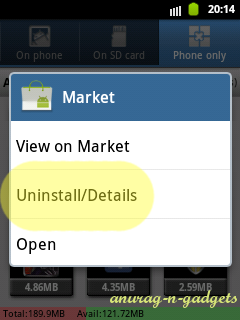
Open the 'Phone only' tab.
Select any app, and hold it for some time till a new window opens up and select Uninstall/ Details.


Step III

A new window will open, then select Clear data option from it.


Step IV

Now you are done, but be sure to do this procedure with every app. And if possible then restart your phone too. Comment and share my post if this was helpful.

[NOTE: PLEASE don't do this for any game if you have reached maximum level and don't want to play it again from the beginning.]