Showing posts with label galaxy. Show all posts

September 18, 2013

Galaxy Note 3, priced at 49000!


Being Apple's device launched, its mandatory for its competitors to launch something priced almost at a same range. Galaxy Note 3, a new niche device being launched in the Galaxy Note line by Samsung. Also, it released a bundle of much anticipated devices such as Galaxy Note 10.1 slate and the Galaxy Gear.


Samsung Galaxy Note 3, being the successor of Note 2 holds up a 5.7" Super AMOLED display with 1080p resolution and runs on the latest yet most powerful chipset till date, the Snapdragon 800 and sports a 13MP camera with 4K video recording capability.


The S-Pen is what actually makes the Note lineup so special, and Samsung has surely provided the Note 3 with even more S-Pen compatible apps, handwriting-recognition features and drawing tools.
Samsung is well known for its plastic smartphone designs. The Galaxy S4, Galaxy Note 2 and Galaxy S3 all featured polycarbonate plastic designs that differed greatly from Apple’s two recent iPhone designs. The most recent, the iPhone 5, combined glass and aluminum to create a beautiful industrial design that offered a much more premium build than the Galaxy designs.

Check the full specs here

June 30, 2012

Update for my Galaxy Y, its Awesome :)

Hello readers, this is me blogging from my home PC. As I was suffering from a severe tonsil infection in my throat, so I tried updating my trusty Galaxy Y to the latest firmware, i.e.
PDA:LE1/PHONE:LE1/CSC:LD1
(as seen in my Kies app) but in my phone menu, the Kernel version is showing up as S5360DDLE1. I didn't used Kies for updating it, just did a FOTA update.
So here are some pics:

Before Updating: -


After Updating :- 


There are many changes like the lock screen and some bug fixes.
So, Samsung has added some new transition like the new Galaxy range for ex. Galaxy Mini 2.
The lockscreen has a nice lock/ unlock effect. Also some scrolling effects and the navigation bar effect have been changed.
All in all, a nice bug fix and look update.

Regards,
Anurag Ganguly | Anurag n Gadgets :)

Also check out my new tech n photography blog HERE

January 22, 2012

Backup your market apps on Android

Whenever you download any app from the market place, you want it to be in .apk format. So that you can anytime install it on your  phone  again when you format it or uninstall the particular app. 
For that thing, there's an app called  App  Backup & Restore, which is available for free over the marketplace.

Download Link: Click here


This app is a great tool, which is easy to install and fun to archive the apps.


Some great features of the app:
- Backup apps to SD card
- Batch backup
- Backup market link for protected apps
- Restore apps from SD card
- Batch restore
- Quick uninstalling
- Sort apps by name, install date, size
- Auto backup on install
- Show storage usage
- Multi version backup
- Search app from Google market
- Send apk file by email
- Share market link
- Support App2SD

Hope you like my post and follow my blog.
Subscribe to my blog to get regular newsletter via e-mail.

Regards,
Anurag Ganguly

January 20, 2012

[Tutorial] How to speed up your Droid

Hey guys, I recently got my droid, the Samsung Galaxy Y S5360 Android smartphone. I am using this phone since 1 week and I just got addicted to it coz I just love it, I mean its so nice and for me, its the best smartphone in the world.
One thing every android phone should be treated with, is downloading and installing App 2 SD pro. Its a nice and free app that you get from the marketplace and you can now save and install all your apps directly in your SD card. But, then also there are some apps which get stuck to the phone memory and therefore result and slowing down the device a bit. If you have downloaded App 2 SD onto you device, then have a look at this tutorial.

Step I

Open the menu and find App 2 SD icon.     


Step II

Open the 'Phone only' tab.
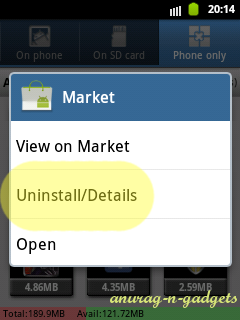
Select any app, and hold it for some time till a new window opens up and select Uninstall/ Details.


Step III

A new window will open, then select Clear data option from it.


Step IV

Now you are done, but be sure to do this procedure with every app. And if possible then restart your phone too. Comment and share my post if this was helpful.

[NOTE: PLEASE don't do this for any game if you have reached maximum level and don't want to play it again from the beginning.]

December 23, 2011

Samsung Galaxy Y and Y Pro Duos surfaces on Web

Hello readers, I am back again with an cheesy news again.
In India, after the launch of dual sim Android phones such as the Micromax Supefone lite A75 and Spice Mi350n, how can Samsung sit quiet? No, no, no don't even think so. While surfing the web I saw something interesting and wanted to share it with you. Some press releases say that, Samsung is going to launch Dual sim variants of its Galaxy Y and Y Pro budget smartphones and are gonna named as Galaxy Y Duos and Galaxy Y Pro Duos respectively. There is even a probability of these phones to release within next two months
(Jan/Feb'12). 

Specs are given below the image.
Samsung Galaxy Y Duos: -
  • Android 2.3 Gingerbread.
  • Same 832 Mhz Processor but with 384mb of RAM this time.
  • 3.14" TFT capacitive multitouch display with same 320*240 QVGA sucking display(why samsung?)
  • Dual Sim (GSM+GSM).
  • 3G, Wi-Fi, GPS , as every android has.
  • A 3.2MP camera at rear(last one had only 2MP). But seriously, no front facing cam.
Samsung Galaxy Y Pro Duos: -
  • Android 2.3 Gingerbread.
  • 2.6" TFT touch screen
  • 832 Mhz processor.
  • All standard Android stuffs I am bored writing it...
  • and yes a  3.2MP camera.
  • PLUS!!! a front facing camera.
Expected launch: -
Near about in Quarter 1 '2012

My Views: -
The Samsung galaxy Y S5360 was targetted mainly for the youth gen ('Y' ). And these two phones with some higher specs like dual sim and a good camera, I think are for those business folks who love a cheesy CLASS sort of phones, mainly the Galaxy Y pro duos, the qwerty version of Galaxy Y duos. Well according to me, a phone is a phone at last, and I dont think about a business or a multimedia tag under a phone. Because, if the phone has simple design it is named after BUSINESS phone. Well, its our(consumers) choice to buy which one........

How many times should I say? It will not take any time to just click on Subsrice be Mail, or Follow me tab on my blog...pls follow me and subscribe via RSS too:)

October 20, 2011

Android Ice Cream Sandwich 4.0 out with Galaxy Nexus!

Hello everyone, the most awaited version of Android, the Ice Cream Sandwich 4.0 is out with Samsung Galaxy Nexus on which it is running. Nexus phones are believed to released with most of the newest Android platforms.


Samsung Galaxy Nexus
And one thing more, according to the web most of the phones running official Android 2.3 (Gingerbread) will get this update.
I personally thought that this version of Android would be also tablet optimized, but for the delight its for mobile phones.

Hope you like my blog and posts.
Follow me.....

October 10, 2011

Samsung Galaxy Y, a new youngster in the Android race..

Hello everyone, and thanks for all the comments I received from you in most of my last posts. 

Samsung recently launched 3 new smartphones, viz., Galaxy Y, Omnia W, and Wave 3.
But I wanted to tell you about the Galaxy Y, because it is balanced more on specs and less on price.
The Y here stands for generation youth on which it is targeted.

Priced at just Rs. 7130, this baby has a powerful 832MHz processor and 256mb of RAM. It also has a 3.0" capacitive touch screen with a QVGA resolution, which is not bad according to its price. And the main thing, it runs on the latest version of Android, i.e. 2.3.5 Gingerbread.

On the sad note, it has nothing to say. But only 2 megapixel camera may disappoint someone, but it can be easily digested if one looks on the advantages of this phone.

The screen, on the phone is extremely responsive (of course, its Samsung buddy) according to the reviews over the web. It supports all the multi touch inputs and gestures. And for the rejoice, Samsung has put its highly customizable TouchWiz 3.0 UI. But for me, LauncherPro or ADW launcher are first choice as they are much more customizable and smooth.

Please read, comment and share my post.
Regards,
Anurag Ganguly